Make videos and slide decks by talking to an AI agent.
Say what you’re making. Your agent plans the scenes, writes and voices the narration, designs the slides and charts, adds captions and music, and edits with you until it’s right — point at any moment or spot to change it, and undo anything.
- Mac and Windows
- Built-in agent, or connect Claude or Codex
- Projects stay on your computer
- MP4, PDF and PowerPoint
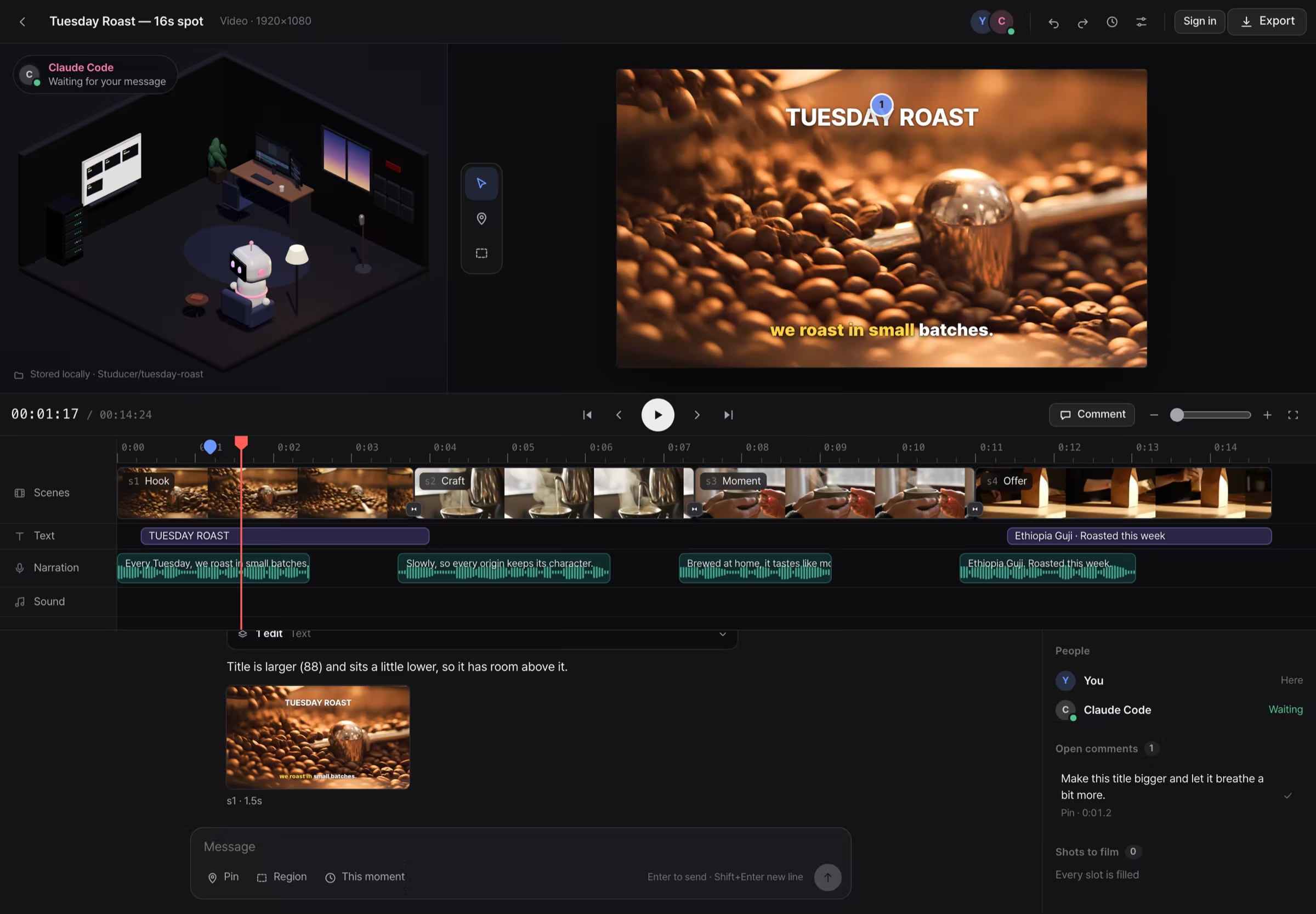
The editor: your agent’s studio and the preview on top, the timeline in the middle, the conversation at the bottom.
From a one-line idea to a finished file.
One editor for the things people actually need to publish — in any size, with your own footage or none at all.
Ads and social clips
Vertical, square or wide, with punchy titles, captions, transitions and a voiceover.
Narrated lectures
A slide deck that becomes a video, with bullets that appear as the voice reaches them.
Slide decks
PowerPoint with editable text and speaker notes, a PDF, or a handout with notes.
Charts and infographics
The agent designs custom scenes — bar charts, diagrams, data callouts — that animate.
Edits of your footage
Drop your clips on the storyboard; cut by the words people say; caption real speech.
Explainers and intros
Product walkthroughs, YouTube intros and onboarding videos with music under the voice.
A conversation that edits the project, not a prompt that starts over.
Your agent sees the whole project, remembers what you decided together, and changes only what you ask for.
Plan it together
Start with a sentence about what you are making and who it is for. The agent lays out the scenes, writes the voiceover and adds titles.
Where footage is missing, each scene says exactly what to film, and the open list stays next to the conversation. Fill a scene by dropping your clip on it.

Point instead of describing
Pin a spot on the frame, draw a box around a region, select a range on the timeline, or attach a whole scene. The agent receives the exact scene and time; for pins and boxes it also gets an image of the frame with your mark drawn on it.
Marked messages stay in an open list until they are resolved, so nothing gets lost between rounds of feedback.

Review every change
Each reply shows the edits it made, and you can open them to see what changed. An orb flies from the agent to the clip or control it touched, so you see where to look.
Every request is one undo step. The history keeps every version, so you can try a direction and go back in a click.

You always know what your agent is doing.
Your agent works in a small studio above the preview. Each step lights up as it goes, with what it just changed — and the edit lands where you can see it.
- Read
Your message, the marks you placed, attached scripts and images.
- Plan
Scenes, structure and the questions that matter before building.
- Build
Scenes, slides, text, charts, motion and transitions in the project.
- Voice
Narration in one of 30 voices, with captions timed to every word.
- Render
MP4, PowerPoint, PDF and more — and you can stop an export any time.
It changes what you ask for, and keeps the rest.
Prompt-to-video tools make a new clip each time. Studucer keeps one project you build together, so every round of feedback makes it better instead of starting over.
| Studucer | Prompt-to-video | |
|---|---|---|
| Change one thing without redoing the rest | Yes — one undo step per request | Usually regenerates |
| Point at a moment or a spot on the frame | Pins, regions, ranges, scenes | Describe it in words |
| Use your own footage, images and scripts | Yes | Limited |
| Editable slides and speaker notes | PowerPoint and PDF | No |
| Where your files live | On your computer | In the cloud |
A whole lesson, made start to finish in Studucer.
Lesson 1 of a beginner course, “Build Your First Website with AI”. The built-in agent made the slides and the narration from two messages, and nothing was edited by hand.
- The brief
One message with the audience, the goal of the lesson, the tone, and a suggested outline of 8 to 10 slides.
- The deck
The agent built 10 slides on a dark theme, with speaker notes and bullets that appear one at a time.
- The narration
A second message asked for calm, practical narration. The agent wrote it for every slide, voiced with a Studucer Cloud voice.
- The video
Exported as a 1080p MP4, 8 minutes 41 seconds, with each bullet appearing as the voice reaches it.
A 16-second spot from your own footage
- One request: “16-second spot, calm and warm, four shots, a short voiceover, captions on.”
- The agent: four scenes, voiceover, karaoke captions, titles, fades.
- You: dropped in four clips and pinned the title once.
Example project with a fictional brand. Shown muted.
Bring the agent you already use.
Press Connect in Studucer and it adds itself to Claude (regular chats or Claude Code) or to Codex in the ChatGPT app. Then paste the sentence Studucer copies for you: your AI joins the project you have open, reads what you write and mark in the app, and edits the project directly.
- No extra AI bill. A connected agent runs on your own subscription; it doesn’t use Studucer credits.
- One agent at a time. The built-in agent steps aside while yours is connected, and comes back when it leaves. Disconnect any agent with one click.
- Compact by design. Agents read a one-line-per-scene outline and edit with short commands, which keeps sessions fast and token-light.
- Nothing to set up? Use the built-in agent and pay with credits.
Works with Claude (chats and Claude Code) and with Codex in the ChatGPT app.
Narration and captions that follow the voice.
Write the line, pick one of 30 voices and describe the delivery, like “warm and calm”. Captions are timed to each spoken word, in five styles: pop, karaoke, clean, box and word-by-word. Change the script and only that line is regenerated. Need music? Describe it and Studucer composes an instrumental track that ducks under the voice.

Script-first
The voiceover lives with each scene, so timing follows the words. Scenes set to auto length grow or shrink with their narration.
Your own audio too
Transcribe the speech in your own clips to caption them, or cut a clip by its words: “from ‘first we…’ to ‘…that’s it’”.
Motion and look
Slow push-ins and pans, color grades, blur, vignette, shake, flashes, nine transitions and animated text, all adjustable by hand or by asking.
The same editor makes decks and lecture videos.
A project can be a slide deck: title, section, bullets, split, media, quote, stat and code layouts, six themes, speaker notes, and bullets that build with the narration. Export PowerPoint with editable text and notes, a PDF handout, or a narrated video of the whole lecture.


Six slides from a lecture deck built in conversation, rendered by Studucer on the paper theme.
Your footage stays on your computer.
Projects are ordinary folders. Studucer edits, previews and renders on your machine, so large files never wait on an upload.
- Folders you choose. Open, move and back up projects like any other files, or save one as a single .studucer file.
- Only what a feature needs. Narration sends its text; transcription sends that clip’s audio. Nothing is kept after the request.
- Private by design. The app window can be hidden from screen recordings and screenshots, and reference images are checked before they’re shared.
One app, three plans.
Every plan includes every feature and the app for Mac and Windows; plans differ only in monthly credits for AI work.
300,000 credits a month
550,000 credits a month
1,250,000 credits a month
One minute of narration with captions uses 2,700 credits; a generated music track uses 4,000. Agents you connect yourself use no credits. Full pricing
Questions people ask first.
What can I make with Studucer?
Short videos, ads, product explainers, social clips, YouTube intros, narrated lectures and slide decks. A project can be a video or a deck, and a deck can also be exported as a narrated video. Any aspect ratio works: 16:9, 9:16, 1:1, 4:5 or a custom size.
Do I need my own AI agent?
No. Studucer has a built-in agent that works with your plan’s credits. If you already use Claude (regular chats in the Claude app, or Claude Code) or ChatGPT’s Codex (included with paid ChatGPT plans; regular ChatGPT chats can’t connect to apps on your computer), connect it instead with one click: it joins the project you have open, keeps its own memory of the conversation, and its usage runs on your own AI subscription rather than Studucer credits. One agent works at a time — the built-in agent steps aside while yours is connected.
What do I need to run it?
A Mac with Apple silicon running macOS 13 Ventura or later, or a 64-bit PC with Windows 10 or 11, and an active Studucer plan. Choose a plan, download the installer for your computer from your account, and sign in to the app with the same email. Updates install automatically.
Where are my projects stored?
On your computer. Each project is a folder you choose, and editing, previews and exports all happen locally. When you use an AI feature, only what that feature needs (for example the narration text) is sent through Studucer Cloud to the provider, and it is not kept after the request.
What do credits pay for?
Only AI work done by our servers: narration (45 credits per second of speech, with word-timed captions included), transcription of your own clips, generated background music (4,000 credits per track), and the built-in agent. Every plan includes monthly credits, and you can upgrade at any time when you need more. Editing, previews and exports don’t use credits.
Can I give the agent my script or a reference image?
Yes. Attach text files — a script, notes, an outline, subtitles or data — and the agent works from them. Attach or paste an image and it sees it as a reference for style, layout or color. Every image is checked first: images showing a person’s face, offensive words, occult or demonic imagery, sexual content, gore or hateful content can’t be shared.
Can it make music and sound effects?
Background music, yes: describe the mood, genre and instruments and Studucer composes an instrumental track that loops under your video. Sound effects come from audio files you add. Studucer doesn’t generate pictures or video with AI — it works with your own footage and images, slides and charts the agent designs, and generated narration and music.
Can I use my own footage, images and music?
Yes. Drop video or images on a scene to fill it, and drop an audio file on the Sound track for background music. Studucer makes preview copies so even long phone footage stays smooth while you edit.
Can I undo what the agent did?
Always. Every reply from an agent lists the edits it made, each request is one undo step, and the full history lets you go back to any earlier version of the project.
What can I export?
Video as MP4, MOV (ProRes), WebM or GIF; audio as MP3 or WAV; captions as SRT or WebVTT; the current frame or every scene as PNG or JPEG; and documents as PowerPoint with editable text and speaker notes, PDF, a PDF handout with notes, or a Markdown outline. You can also save a whole project as a single .studucer file.
Can I use the results commercially?
Yes. You own what you put in and what Studucer makes for you, as described in our Terms. Narration made with Studucer Cloud voices can be used in commercial work.
Guides for working with an agent.
Editing video with an AI agent: why a conversation beats a single prompt
A finished video is the result of dozens of small decisions. Here is why editing in an ongoing conversation with an agent that sees the whole project works better than starting over from a prompt each time.
Using Claude or ChatGPT to edit video and slides with Studucer
Connect Claude (chats or Claude Code) or ChatGPT's Codex with one click. It joins your Studucer project as a collaborator, keeps its own memory of the session, and edits video and slide decks directly — on your own plan, without Studucer credits.
Storyboard first: plan the video, then film only what's missing
Start from the structure, not the footage. Studucer's agent lays out the scenes and writes exactly what to film for each one, so you shoot a short list instead of everything you might need.
Start your first project.
Choose a plan, download Studucer for Mac or Windows, and describe what you want to make. Already have a plan? Sign in to download.
Mac with Apple silicon, macOS 13 or later · Windows 10 or 11, 64-bit · cancel any time