Editing video with an AI agent: why a conversation beats a single prompt
Most AI video tools are built around one moment: you type a prompt, you get a clip. That is a great way to see an idea quickly. It is a hard way to finish something, because a finished video is the result of many small decisions — which shot opens, how long the title stays, whether the second line of the voiceover lands, what the caption style should be — and each of those decisions depends on the ones before it.
Studucer is built around the other moment: the second, third and twentieth change. You work on one project with an AI agent, in a conversation, and every message moves the same project forward.
The agent sees the project, not just your last sentence
When you ask for a change in Studucer, the agent is not guessing from a fresh prompt. It reads a compact outline of the whole project: every scene with its length, footage, narration, captions, text layers, effects and transitions, one line per scene. It knows that scene 3 is the cup by the window, that the voiceover there is eight words long, and that the project brief says “calm, warm, morning”.
That context is what makes small requests work. “Make it feel warmer” becomes a color grade on the scenes that need it. “The title is too small” becomes a size change on that one text layer, not a regenerated video.
Memory across the session
If you connect your own agent, such as Claude Code, it keeps its own memory of the conversation for as long as the session runs. Studucer hands it only what is new since its last turn: your new messages, the marks you made, and any edits you made yourself in the meantime. The agent does not have to re-read everything, and you do not have to repeat decisions you already made. (The Claude Code guide shows how to connect it.)
Feedback that points at the exact spot
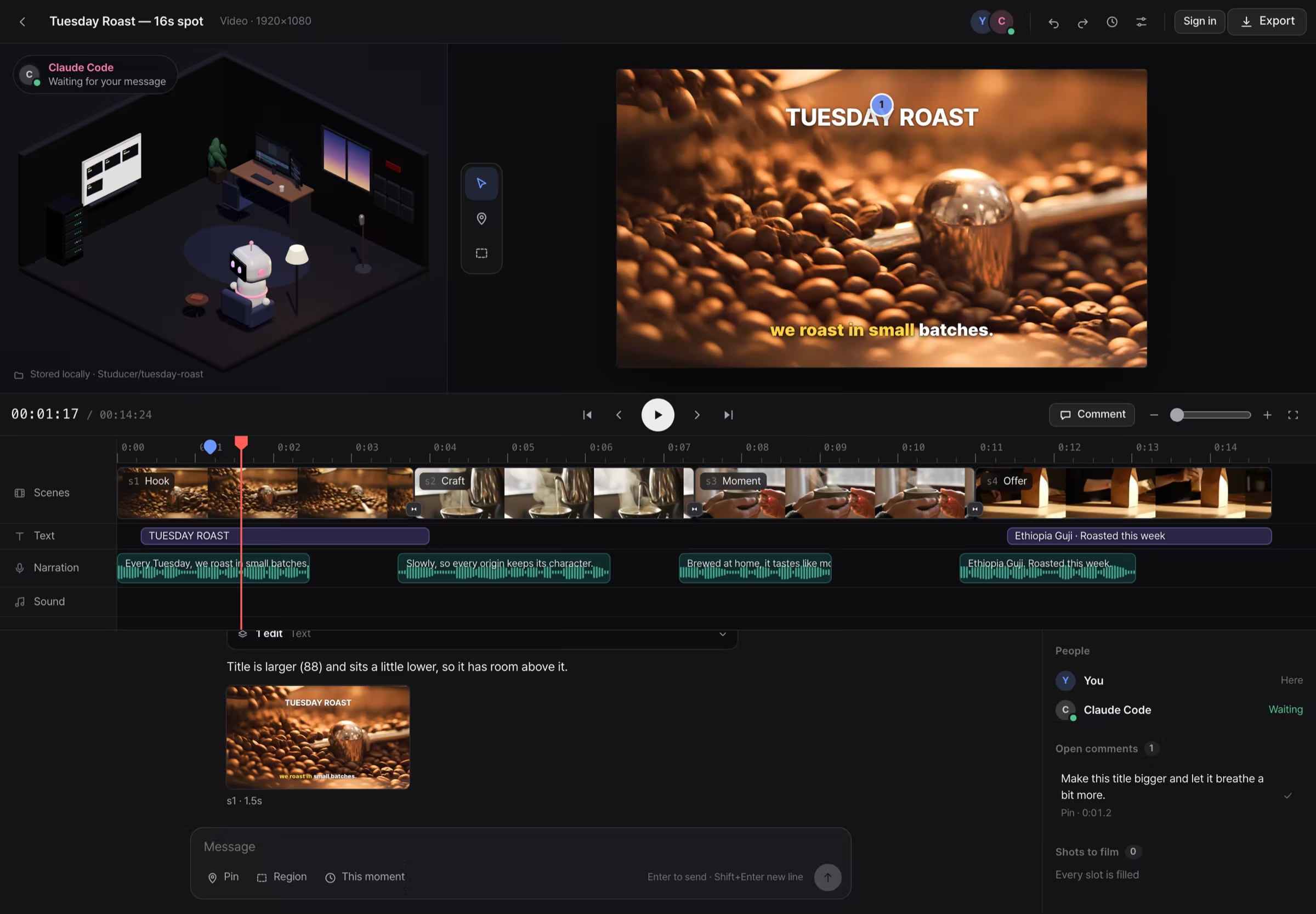
Describing a location in words is slow and ambiguous. In Studucer you can pin a spot on the frame, draw a box around a region, select a time range on the timeline, or attach a whole scene to your message. The agent receives the scene and the exact time, and for pins and boxes, an image of the frame with your mark on it. “Make this bigger” is enough. There is more on this in Point, don't describe.
Every change is visible and reversible
Each reply from the agent lists the edits it made, and you can open them to see exactly what changed. In the app, an orb travels from the agent to the clip or control it touched. Every request is one undo step, and the version history keeps every state of the project, so trying a bold direction costs nothing. See Every AI edit is one undo step.
What this looks like in practice
Here is a real session from a 16-second coffee spot:
- You: “16-second spot for Tuesday Roast's new Ethiopia Guji. Calm, warm, morning feel. Four shots, a short voiceover, captions on.”
- Agent: lays out four 4-second scenes, writes the voiceover, adds karaoke captions and titles, and marks what to film for each scene.
- You: drop in four clips and ask for it to feel warmer and more alive.
- Agent: adds a warm grade and slow push-ins on two scenes.
- You: pin the title and write “make this bigger and let it breathe”.
- Agent: changes that one text layer and shows the updated frame.
Six messages, one project, and every step can be undone.

When a single prompt is still the right tool
If you need a rough clip to test an idea, a one-shot generator is quick. When you are working toward something you will publish, with your own footage, a brand, a script and a few rounds of feedback, a conversation with an agent that edits the project keeps all of that work in one place. We compare the two approaches in more detail in Agent-driven editing or one-shot generation.
Try it
Start a project, write one sentence about what you are making, and let the agent lay out the first draft. Your plan's credits are only used for AI narration, transcription and the built-in agent; editing and exports don't use them.
Try it on your next project
Describe what you want to make, point at what to change, and let your agent do the editing.
Get StuducerKeep reading
Using Claude or ChatGPT to edit video and slides with Studucer
Connect Claude (chats or Claude Code) or ChatGPT's Codex with one click. It joins your Studucer project as a collaborator, keeps its own memory of the session, and edits video and slide decks directly — on your own plan, without Studucer credits.
Storyboard first: plan the video, then film only what's missing
Start from the structure, not the footage. Studucer's agent lays out the scenes and writes exactly what to film for each one, so you shoot a short list instead of everything you might need.
Point, don't describe: giving feedback with pins, regions and ranges
“The text in the top left, about two seconds in” is slow to write and easy to misread. In Studucer you pin it, box it or select it, and the agent gets the exact scene, time and frame.